
The web development landscape has undergone a significant transformation. Where 2020 was defined by Client-Side Everything, 2026 is characterized by the Unified Stack. Next.js 16 is now more than just a React framework; it functions as an advanced orchestration engine that seamlessly integrates the server and the browser.
This guide focuses on architecting a high-performance system, not simply building a website. This architecture is built to maximize the impact of the most important advancement in React history: The React Compiler.
The Paradigm Shift: From Manual to Auto
For years, React developers were burdened with “manual performance tuning” – scattering useMemo, useCallback, and memo throughout their code like digital duct tape.
Next.js 16 changes the game:
- The React Compiler: Now fully stable and integrated, the compiler automatically optimizes your components. If your data hasn’t changed, your component won’t re-render. Period.
- Server-First Mentality: We’ve moved past the “Client Component by default” trap. In Next.js 16, the server handles the heavy lifting, sending only the minimal, essential interactivity to the user’s device.
- Turbopack Standard: Webpack is officially a legacy term. With Turbopack, your development server starts in milliseconds, regardless of how many thousands of modules your project contains.
The 2026 Power Stack
To get the most out of this guide, we will be using the industry-standard stack for 2026:
- Next.js 16 (App Router): Our foundation and routing engine.
- Tailwind CSS 4: Featuring the new engine that compiles 5x faster and uses zero-runtime CSS variables.
- Zod & Server Actions: For end-to-end type safety without the need for manual API definitions.
What We Are Building: The Pulse App
Theory is fine, but code is better. Throughout this guide, we will build Pulse – a real-time feedback dashboard designed for high-traffic environments.
Pulse will feature:
- Instant Interaction: Using Optimistic UI updates.
- Zero-Jank Loading: Leveraging Partial Prerendering (PPR) to show static content immediately while dynamic data streams in.
- Edge-Ready Architecture: A backend that scales globally by default.
Note: If you’re coming from a background of Create React App or even early versions of Next.js, some of these concepts might feel “backwards” at first. That’s okay. We are moving the logic back to the server to give our users the fastest possible experience.
Let’s get your environment ready.
Environment & The Turbopack Foundation
Before we write our first component, we need to establish a rock-solid foundation.
In 2026, the tooling surrounding Next.js 16 has matured to focus on instant feedback loops and type-safe configurations.
Prerequisites: The Modern Runtime
Next.js 16 requires Node.js v20.9.0 (LTS) or higher. This version includes native support for advanced streaming APIs and improved memory management for the React Compiler.
Verify your version in your terminal:
node -vTo install Node.js, which is required, please download the installer from here.
Initializing Pulse
We will use the interactive CLI to scaffold our project.
Run the following command:
npx create-next-app@16.2.5 pulse-dashboardFor a consistent learning experience, use Next.js version 16.2.5. All examples and explanations are based on and tested with this specific version. Using newer versions may cause compatibility issues or require code adjustments. Please verify your project’s package.json to ensure your environment aligns perfectly with this guide. Sticking to version 16.2.5 guarantees a smooth and predictable learning journey.
During the setup, select the following industry-standard defaults for 2026:
- TypeScript: Yes (Non-negotiable for professional dev)
- ESLint: Yes
- Tailwind CSS: Yes (v4.0)
- src/ directory: No (We will use the root app/ directory for simplicity)
- App Router: Yes (Mandatory for Next.js 16 features)
- Turbopack: Yes (This replaces Webpack for development)
The Next.js app initialization process will ask you to use above recommended defaults.
This is how it’ll look like in your terminal to initialize a Next.js project.
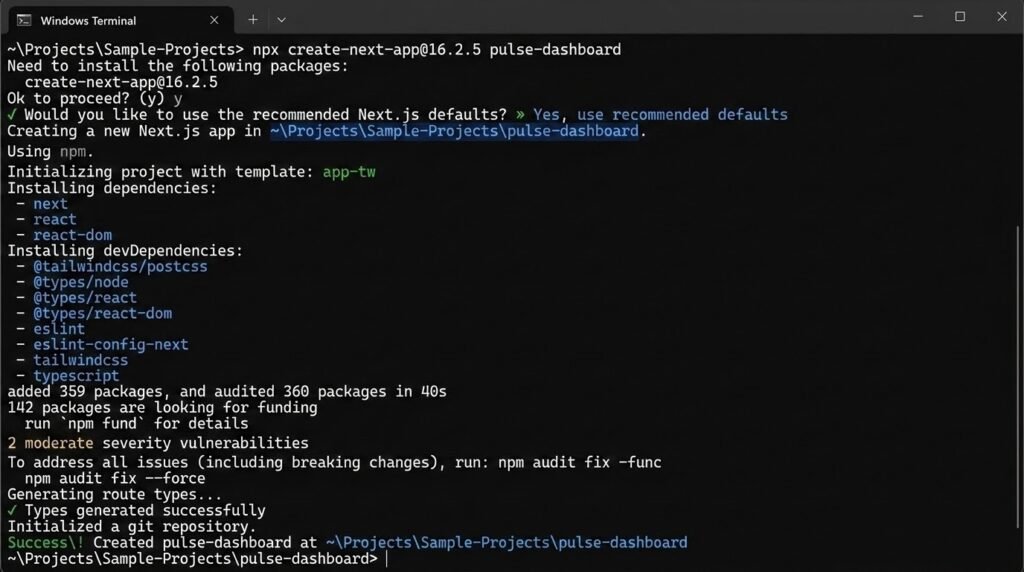
Note: If you see some warnings that’s okay to ignore them for now.
Understanding Turbopack
The most important under-the-hood change is Turbopack. Unlike Webpack, which bundles your entire app, Turbopack uses an incremental engine.
It only compiles the code you are currently looking at. If you have 1,000 pages but are only editing the Dashboard, Turbopack only cares about those specific files. This results in Hot Module Replacement (HMR) that stays under 50ms, regardless of project size.
Configuring the React Compiler & Cache Components
Next.js 16 introduces two major architectural features that we need to enable in our configuration:
- The React Compiler – which automatically optimizes component rendering.
- Cache Components – which natively handles the static shell and dynamic streaming behaviors previously known as Partial Prerendering or PPR.
To enable these features in our Pulse app, follow below steps.
Step 1: Install the Babel Plugin for the Compiler
The React Compiler runs through a Babel plugin under the hood (which is heavily optimized by Next.js’s SWC engine to only run on relevant files). We need to install it as a development dependency.
CD to your project root andrun the following command in your terminal:
npm install -D babel-plugin-react-compiler
Step 2: Update your Configuration
Open your next.config.ts and add both at the root level of your configuration object.
- reactCompiler: true
- cacheComponents: true
Note: You no longer need to use the experimental.ppr key. The new Cache Components architecture naturally supports rendering static shells with dynamic holes using the ‘use cache’ directive.
import type { NextConfig } from "next";

const nextConfig: NextConfig = {

  // 1. Enable the React Compiler (eliminates need for manual memoization)
  reactCompiler: true,

  // 2. Enable Cache Components (the new foundation for caching and PPR)
  cacheComponents: true,

};

export default nextConfig;
With reactCompiler: true, you can stop worrying about manually wrapping your code in useMemo or useCallback. The compiler will automatically preserve referential integrity for your objects and functions. Meanwhile, cacheComponents: true allows us to use the new ‘use cache’ directive later in the guide to perfectly cache our static layouts while streaming dynamic data into our Pulse feed!